Showing posts with label video utility. Show all posts

Friday, October 15, 2010

GetFLV Pro 8.9 Multilanguage

GetFLV is a totally integrated suite of powerful utilities to download, manage, convert, repair and play FLV video files (Flash video). FLV Downloader: A powerful tool to download FLV from all video sharing sites with the technologies of automatic URL-parsing. FLV to Video Converter: Convert FLV files to popular video formats. It lets you convert FLV to AVI, MPEG, MP4, 3GP, MOV, WMV and etc. FLV Audio Ripper: Extract FLV Audio to popular audio format. It lets you convert FLV to MP3, WMA, WAV, AAC and etc. Video to FLV Converter: A professional conversion tool to convert video to FLV. It supports almost all types of video formats such as MPEG, AVI, WMV, MOV, ASF, MP4, 3GP and etc. FLV Fixer: Repair the FLV video files that can't be seeked. More FLV utilities will be added.

GetFLV 2009
• Download and manage FLV video files
• Convert FLV files to popular video formats
• Extract FLV Audio to popular audio formats
• Convert popular video to FLV
• Repair FLV video that can't be seeked
• More FLV utilities will be added in future
• The complete FLV utility package.

ZC Video Converter 3.9.6.1740 Multilanguage

ZC Video Converter is the best choice for portable media device(iPod, iPhone, Mobile phone, Pocket PC, Sony PSP, Microsoft Zune, Apple TV ect) holder. It also can author and burn all video files to DVD movie and burn onto DVD Disc, then you will be able to playback on your TV DVD Player. You don't know any basic knowledge on media and portable device, that's not a problem, ZC Video Converter will do anything for you. Whatever you need to do is to 1-click to select the output profile settings, and then click start button, ZC Video Converter will finish the left mission for you, output the video movie and audio music you want.

Here are some key features of "ZC Video Converter":

· 1-click conversion for all video to all video without losing quality.
· 1-click output profile settings .
· Support almost any video movie formats input and output.
· Shutdown computer automatically when job is done.

Home page - http://www.videoxdvd.com/

Tuesday, September 28, 2010

YouTube Downloader 2.6.2

This simple freeware application works pretty well, given how basic the interface is. It has two main features: to download FLV files from YouTube, and to convert them to most major formats. If there's a YouTube URL in your clipboard, it will automatically paste it for you when you click on the dialog box. From there, just hit OK and the downloading will commence. One more left-click is all it takes to load the file in the converter, which supports iPhone, iPod, PSP, cell phone, AVI, MP3, WMV, and Xvid. Surprisingly, there's also a basic video editor for cropping videos by time stamp. You can also cut out the sound when converting.
This is one of the lightest editors around, but the simplistic interface belies its functionality and it performs exactly as advertised. We'd like to see support in future editions for hunting down missing codecs, and version 2.1.5 and earlier won't work because of embed code changes on YouTube itself. Still, the YouTube Downloader is proof that not only is video-making accessible to everyone, so is video downloading and editing.

aTube Catcher 2.2.519

DsNet's aTube Catcher provides a simple tool for watching video from the Internet and converting existing video to another format. While this would be more than adequate for most uses, it also provides a neat feature.
The program's interface was a treat, breaking both its primary functions into a few simple, intuitive command icons. At no point did we feel the urge to go to the Help file for clarification. All you need to do is give aTube Catcher the URL of any online video, and the program will converted it into the file type of your choice. While this is a simple process, the conversion nevertheless took longer than we expected, several minutes for a relatively short four-minute video. Once converted, the video played flawlessly, and it retained all its original material. The program also takes existing video and converts it to another file type. This function was much faster, and it also retained all the specifications of the original. The program is relatively light on features, though it does provide templates for conversion so that, for example, iPod users don't have to know exactly what file type they need to watch a video. The program automatically chooses the proper configuration. We enjoyed aTube Catcher's simplicity and its excellent results.
This free program installs desktop icons without permission. While it could have downloaded faster, this slight negative was outweighed by its simple operation and impressive results. We recommend this program.

Saturday, September 25, 2010

Windows 7 Codecs 2.6.4

All the codecs you need for Windows 7 to play AVIs, DVDs and more!

It does not contain a media player and it does not associate file-types. With the Windows 7 codec package installed you will be able to use any media player, limited only by the players' capabilities, to play all movies and video clips. Streaming video is supported in several formats in all popular web browsers. Users of the Windows 7 media center codecs have the ability to choose what is installed and where to install it using the public redistributable. After installation you can select to remove specific portions without removing the entire package. You can also re-add the removed items at any time.

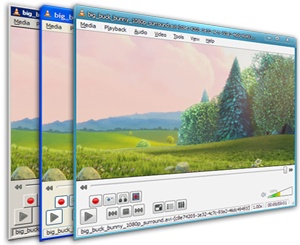
VLC Media Player 1.1.4

VLC media player is a highly portable multimedia player for various audio and video formats as well as DVDs, VCDs, and various streaming protocols without external codec or program.
It can also be used as a server to stream in unicast or multicast in IPv4 or IPv6 on a high-bandwidth network.
VLC can play:
  • MPEG-1, MPEG-2 and MPEG-4 / DivX files from a hard disk, a CD-ROM drive, and so on
  • DVDs, VCDs, and Audio CDs
  • From satellite cards (DVB-S)
  • Several types of network streams: UDP/RTP Unicast, UDP/RTP Multicast, HTTP, RTSP, MMS, etc.
  • From acquisition or encoding cards (on GNU/Linux and Windows only) 

Friday, July 30, 2010

VLC media player

VLC media player is a highly portable multimedia player for various audio and video formats as well as DVDs, VCDs, and various streaming protocols without external codec or program.
It can also be used as a server to stream in unicast or multicast in IPv4 or IPv6 on a high-bandwidth network.
VLC can play:
  • MPEG-1, MPEG-2 and MPEG-4 / DivX files from a hard disk, a CD-ROM drive, and so on
  • DVDs, VCDs, and Audio CDs
  • From satellite cards (DVB-S)
  • Several types of network streams: UDP/RTP Unicast, UDP/RTP Multicast, HTTP, RTSP, MMS, etc.
  • From acquisition or encoding cards (on GNU/Linux and Windows only)

Saturday, June 26, 2010

The KMPlayer 2.9.4.1437

Despite lacking a Help file, KMPlayer is one of the most powerful freeware video players we've seen. It includes a vast array of video- and audio-capturing options, as well as skins, a plethora of playback controls and tweaks, and broad DVD support.
You'll have to learn the ropes yourself, perhaps a hindrance to newcomers. But if you're familiar with where things ought to be in programs, and willing to patiently wait for mouse-over labels to pop up and then click on them for the actual menus, KMPlayer has the potential to be immensely rewarding. It supports all major file formats, and all of the minor and obscure ones we tested. It did have problems with the RealPlayer 11's video capture IVR format, but not much else.
Advanced options include frame capture and a frame-forward feature, which is actually a fractional Play button, but the difference is negligible. The Pause button is a fast responder, too. Combined with streaming TV and HDTV compatibility, playlists, and the ability to select which codec is used on a video-by-video basis, and you get a media player that demands attention.

Friday, June 4, 2010

ManyCam Virtual Webcam 2.4.69

ManyCam is the freeware tool for you if you use both CamFrog and ICQ, or any other video chat program, and you want to use them simultaneously. It creates a "virtual" Webcam that replicates your currently installed camera. It then lets multiple applications access the video stream without conflict.
ManyCam is compatible with Yahoo, MSN, CamFrog, PalTalk, ICQ, Skype, YouTube, and more. Once you've installed ManyCam, you need to set ManyCam as the primary input for program that you want to use. ManyCam will automatically start when activate your Webcam through that program. The application includes a bunch of gimmicky features that let you change aspects of the background and foreground. You can map a new pair of cartoon eyes over your face, and they track pretty well to your movements, or you can show that your life is hell by replacing the background with flames.
There is an unfortunate toolbar that will install unless you opt out during setup, but other than that ManyCam is worthy of a Webcam Oscar for cool and useful tech.

Vuze 4.4.0.4

Formerly the feature-rich Azureus, Vuze takes Azureus' BitTorrent foundation and builds on top of it a network for video discovery and user-created video publishing tied together by social networking.
From XML torrent options to IP filters, firewall tests to UPnP plug-ins to baked-in social networking, Vuze isn't breaking new ground--the original BitTorrent client has gone this path, too--but it is doing it in an innovative and attractive way. When you install the program, you're faced with an interface that will be instantly familiar to iTunes users. In providing a general overview of their torrents and media playback controls, the new layout emphasizes user-initiated searches.
The Advanced tab has been replaced by My Library. The old Azureus is now completely gone, but because of the demands of users, Vuze 4.0 is much closer to the intent of its progenitor than Vuze 3.1 was. A simple, three-step guide that launches when you start Vuze helps you get acclimatized to the new Vuze. There's still work to be done: memory usage is up around 100MB, and although you can set up private trackers, you can't customize the search box. People new to torrenting or only interested in sharing media files might appreciate this visually active approach.

Saturday, April 24, 2010

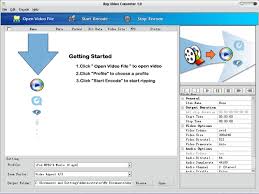
Any Video Converter 3.05

Any Video Converter is an all-in-one video converting freeware with easy-to-use graphical interface, fast converting speed, and excellent video quality. It can convert almost all video formats including DivX, XviD, MOV, RM, RMVB, MPEG, VOB, DVD, WMV, and AVI to MPEG-4 movie format for PSP or other portable video device, MP4 player, or Smartphones.
What's new in this version:
Version 3.05 adds Dutch language interface, adds the "medium" video format option for YouTube downloading.

GOM Media Player 2.1.25.5015

As various media players jockey for position to become your default setting for music and video streams, GOM Media Player's support for a wide range of file formats has helped it stand out as a firm favorite.
Supported formats include DAT, MPEG, DivX, XviD, WMV, ASF, AVI, and MOV, as are common codecs like FLV1, AC3, OGG, MP4, and H263. A pop-out playlist can save and organize your various media files, though the limited sort modes--two--hardly makes it a champ.
More impressive are the customizable settings on the control panel. Here you can adjust a video's image brightness, hue, and saturation. There's no preview window, and changes occur as the video runs, so unless you care for a rousing session of trial and error, be sure to tweak the settings after clicking "play." There's also a built-in screen-capture feature that includes zooming and panning, customizable themes, hot keys, and a host of preset and adjustable audio controls.
GOM is weakest when you're looking for help documentation and trying to tweak Save settings, but overall it's a very strong player worth at least a supporting role in your video-watching habits, if not the lead. 

Saturday, April 17, 2010

Free Movie DVD Maker 3.0.90723

As a powerful DVD burner, Movie DVD Maker can convert videos of almost all formats like WMV, MKV, AVI, DivX, XviD, MPEG, MP4, QuickTime, Real Video, H.264/AVC, M2TS, MTS, M2T, etc, to DVD and burn on DVD+R/-R, DVD+RW/-RW and DVD-5/9 discs. It supports PAL and NTSC TV systems and 5.1 surround sound. Easy converting and burning steps plus trimming video and creating DVD menu functions make it be the best choice of DVD maker.

What's new in this version:
Version 3.0.90723 adds Windows 7 compatibility. 

Windows Movie Maker (Windows XP) 2.1

Windows Movie Maker 2 is so easy a child could use it--an incredibly patient child born to filmmaker parents who didn't mind restarting this application every few minutes. From the get-go, you get the feeling that this isn't going to be an easy program to like; Microsoft's installer doesn't play nice. It gives the user no input on program location or other options. The plain interface promises simplicity with drag-and-drop storyboard options, though during testing, it was more like drag and freeze. The program typically froze while importing MPG video files. If importing worked, Movie Maker 2 would quit responding when clips were placed on the storyboard. On the rare occasion that our testers made it to the storyboard, the program would freeze when adding one of the numerous effects. There were so many hurdles to creating a short video that no editing seemed preferable to using this software. What's more, uninstalling the program was even more tedious than installing it. It should be no surprise, then, that we can't recommend this freeware for any user.

Friday, April 9, 2010

RealPlayer SP 1.1.1

These days, a great number of people are not only finding the majority of their entertainment online but are also conducting a fair amount of their social lives there as well. In such times, it's great to have a quick and simple tool for downloading, editing, sharing, and transferring media. RealPlayer SP for Windows already had most of that down, but the latest version brings the features full circle.
RealPlayer SP has been around since 1995, which is practically the dawn of the Web. It started as a basic media player, becoming the preferred embedded app for streaming audio and video as sites started to offer that functionality, and eventually morphing into the easy-to-use, fully-functioning beast we have today.
The previous version of RealPlayerSP already offered an easy, one-click solution for downloading unprotected videos for the Web. Another click transcodes those same videos to your portable device without a bit of extra effort on your part when it comes to fiddling with tricky digital format settings. The latest version of the software not only adds even more devices to the ever expanding list of compatible handsets, but also incorporates a very simple-to-use video-trimming tool that allows you to select only certain bits of a video to transfer or share.
Plus, the program has incorporated one-click buttons that let you share with a variety of social sites, such as Facebook and YouTube. In addition, you have the option to strip the audio out of the videos and save those as separate files. And you can do all this for free, as RealPlayer SP requires only a license fee if you want upgraded features, such as H.264 conversion and DVD burning.

Thursday, April 1, 2010

VLC Media Player 1.0.5

VLC Media Player is a long-time open-source favorite, and the latest version is also the first to be out of beta development. It's not the only option for free video playback, but it's one of the best, and the feature updates in version 1 make it well worth the upgrade.
Users can now get frame-by-frame advancement, granular speed controls allowing for on-the-fly slower or faster playback, and live recording of streaming video. The toolbars are fully customizable, so you can have only the buttons you need in the interface, there's AirTunes streaming, and there's better integration in Gtk environments. Along with the improvements, VLC continues to offer robust support for a wide range of video and audio formats, including OGG, MP2, MP3, MP4, DivX, HD codecs like AES3, Raw Dirac, and even support for playing back zipped files. The default interface is still a stripped down player that belies VLC's functionality and features. Skinning can fix that quickly, but behavior can still be a bit unpredictable depending on the quality of the skin. VLC's open-source foundation and community ensures that it evolves quickly and often, with new features and fixes released frequently. Overall, VLC Media Player is a must-have application for its ability to open just about any type of video file you throw at it.

DivX Plus Software 8

With the advent of high-definition video, many people are finding that programs like Windows Media Player just aren't going to cut it for viewing HD content. HD video demands a player that can do it justice, and DivX Plus 8 for Windows is perfectly suited to handle this task.
DivX Plus 8 is a whole suite of utilities, including a desktop player, a converter, a Web player, and the necessary codec pack to handle the content. We put each of the applications through its paces and found them all to be intuitive and well designed. The player is specially designed to maximize the appearance and audio of high-definition video, and we could certainly see the difference in a head-to-head with the same clip played in Windows Media Player. The latest version also makes it easy to transfer content to DiVX certified DVD players or Blu-ray players (or the PS3). If you're looking to optimize videos for the platform on which they will be played, the DivX converter will come in handy. It's impressive how simple it is to use.
The DivX codec comes in handy if you want to view HD videos with other media players, such as Windows Media Player, while the Web player is exactly what it sounds like: an online plug-in that lets you stream HD videos. If any of this sounds confusing, that's because DivX 8 Plus isn't really made for users who aren't at least a bit familiar with the ins and outs of HD video. However, those who are will find this group of tools to be quite helpful. The program has no built-in Help file, but its online support page provides a comprehensive set of FAQs, tutorials, and how-to guides.
It's worth noting that the DivX 8 Plus player takes up a fair amount of processing power, though presumably you won't be using your system for much else while using it, and also that the program installs desktop icons without asking. The overall suite is free, but if there is an option to DivX Pro pack to unlock some features, such as the capability to transcode files for mobile device playback. We recommend this program to all users.

Wednesday, February 10, 2010

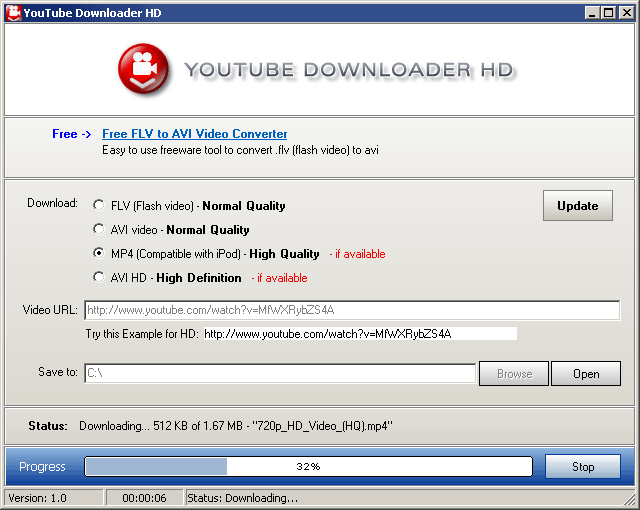
Youtube Downloader HD


Youtube Downloader HD is a free tool to download videos from YouTube and save it to your local computer. The videos can be converted to avi video format or to mp4 (compatible with iPod, iPhone).

The main distinguishing feature of Youtube Downloader HD is that now you can download High Quality videos, High Definition and Full HD videos from YouTube.

Monday, February 8, 2010

YouTube Downloader 2.5.3


This simple freeware application works pretty well, given how basic the interface is. It has two main features: to download FLV files from YouTube, and to convert them to most major formats. If there's a YouTube URL in your clipboard, it will automatically paste it for you when you click on the dialog box. From there, just hit OK and the downloading will commence. One more left-click is all it takes to load the file in the converter, which supports iPhone, iPod, PSP, cell phone, AVI, MP3, WMV, and Xvid. Surprisingly, there's also a basic video editor for cropping videos by time stamp. You can also cut out the sound when converting.

This is one of the lightest editors around, but the simplistic interface belies its functionality and it performs exactly as advertised. We'd like to see support in future editions for hunting down missing codecs, and version 2.1.5 and earlier won't work because of embed code changes on YouTube itself. Still, the YouTube Downloader is proof that not only is video-making accessible to everyone, so is video downloading and editing.